How much does it cost to make an app?
How to estimate taking your idea to a working app for iPhone, Android, or the Web

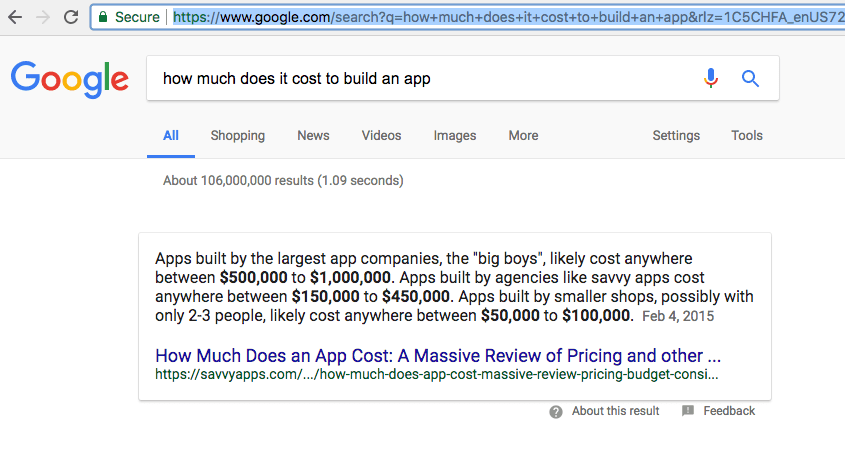
So you have the next big app idea. Or maybe you have mapped out the perfect system to run your business (that you can't already buy off the shelf). How much could it really cost? Maybe you think it doesn't seem "too difficult or complicated" or perhaps you know that your business process is complex and so your application will need a lot of heavy lifting. Web apps can cost anywhere from $20,000 to 1,000,000 and a quick google search of " how much does it cost to build an app" returns an answer starting at 100k. While apps are not 'cheap' to develop, you don't have to fork over a small house in one chunk to get a working prototype going.
In this post we'll take a look at how move forward with application development , how much it costs, and how to manage that cost into payments that allow you to move forward with your project.
Here's what you need to know:
1. Every application, every single one requires software engineering.
When you say "It doesn't seem that complicated", in some ways you're right. Instagram doesn't seem that complicated, people take pictures, upload them, and comment / like them and message each other. The fact remains however, that someone has to write all of that code to make it happen. Thousands of lines (sometimes hundreds of thousands) of code go into creating an enterprise application. It is important be cognizant that even the most simple seeming app takes hours and hours of work by multiple talented developers; there is no "copy and paste'. Custom applications are, well, custom and should be coded from scratch. This doesn't mean you should have to pay to re-invent the wheel, it just means that it will help you during the development process if you understand that a seemingly simple idea of the working product does not translate to simplicity in the making of said product. In fact, simplifying a user experience can sometimes require far more engineering talent to do all of the heavy lifting 'behind the scenes' so the user has an intuitive experience.
With that said, here is what we think you should expect to pay and how you can work within a budget to get there.
a) Most agencies with really talented developers charge about $150 per hour and if you google "How much does it cost to make an app" you will find $50,000 as the low end price tag and 500k - 1,000,000 as a common price tag for larger organizations. Don't fret, your app does not have to cost 100k at first (or ever for that matter).
b) You can outsource to another country for a fraction of the cost, be we don't recommend that for anyone that is not already an experienced software engineer. If you do, good luck unless you speak that language, and have an understanding of the work and cultural values of your newly hired freelancer. Many projects outsourced by novice developers or entrepreneurs are never completed or launched due to lack of communication, poor code quality (due to lack of communication or experience), and lack of budget (due to length of time to debug and fix a plethora of preventable bugs) caused also by, you guessed it, lack of communication.
c) You can insource to a USA based agency (like us for example) who is experienced working with internal and external teams to quickly bring your idea to a working prototype (many times within weeks). Producing a quick prototype of your idea in working form is called the minimum viable product or (MVP) and it allows you to get a hands on feel for what your product will do and how it will work before you have paid for the entire project.
2. You Should Start with an MVP and then iterate
The M
inimum V
iable P
roduct is the bare bones of your application. It doesn't need to have every single feature or module that you ever thought of, it just needs to look the way you envision the app and handle the minimum basic process around your idea or business. This is where you really have to sit down and make a list of "Must Have" features and "Nice to Have" features. Must have features make it in the MVP and Nice to Have features are backlogged for future updates.
The MVP process is a huge time and money saver when you are first creating your application. At World Source Tech, we encourage clients to define the minimum viable product and 'nice to have features' at the beginning of the project. Then, we allow clients to pay monthly, associating each payment with a deliverable of one to three features that will be delivered at the end of a 4 week (sometimes 8 week) period, known as a sprint. Every payment you make goes toward producing usable functionality in your minimum viable product.
Monthly retainers for application development start around $5,000 per month. An average is probably $7,500 per month with a list of deliverable features attached to each retainer payment (or over a 2 month period if one feature set is quite large). This process allows for agile development rather than waterfall development. With waterfall development you pay a deposit, progress payment and final payment. We allow clients to take either approach but highly recommend an agile approach with monthly retainer so that feature sets are associated with each payment. This monthly payment / deliverable attachment makes the project run in a way that produces a chunk of features that can be physically tested in the application in monthly or bi monthly intervals.
3. Take your MVP to the next level - testing
Once you have your MVP working, you are ready for alpha and beta testing. Testing is a key component to application success wether you are making an iPhone app, a CRM/ERP system, or a game . It is imperative that you ensure the general audience you'll be serving understands how to use your application, can do so easily, and that the application achieves the overall business goal. During the testing phase you'll pay for hours spent collecting, interpreting, and refining based on user feedback. You will want to first collect user experience data using surveys and in person testing events, generate a "punch list" for refinements, and then repeat the process. You'll continue doing this until you have a product you can launch to a limited audience for beta testing.
4. Beta testing
You have a working app, and your smaller test groups like it after their feedback has been used to make the appropriate changes. Before you scale to the masses, let's make sure everyone using your application knows it is still in 'beta', and let's continue to keep the number of users small so we can get more generalized feedback, making refinements based on input from a larger, yet still controlled audience.
5. Launch 1
Your first launch will be the delivery of your refined minimum viable product. This should be the end of the initial development cycle and at this point you'll be paying for hosting and support but not for development (unless you keep development engaged to continue refining and adding features).
6. Bells and Whistles Launch
Now that you have your live application, it's time to take a look at our feature backlog which includes those 'nice to have' features. Now is the time to bring in the next most important feature that will improve the experience and expand the audience for your web or phone application.
We also recommend paying for these additional development items in chunks overtime using with a similar process used to develop the MVP. Select the features, determine the time they will take to develop, and divide the cost into monthly payments over that period of time. Try connecting each payment to a set of deliverables if possible.
Creating an app is not a 'cheap' process, and it shouldn't be. You want a talented development team bringing your idea to life so your application can achieve the goals you've set for it. However, you shouldn't have to fork over 100k+ at the start of the project. Instead, try breaking payments down into a monthly retainer associated with specific deliverables at the end of each sprint. Doing this will get you to a working MVP that you can continue to iterate on over time.
To learn more about estimating the cost to develop your next web, iPhone, or Android application, say hello
to get a call from one of our application development experts. We'll walk through the application development process in a no pressure conversation. If you're interested in moving forward with an application development project to bring your idea or system to life, we'll prepare a detailed proposal to get you started.

The Digital Transformation of Custom Manufacturing: Why Instant Quoting is the New Industry Standard